


VTuberCam: Building a Native macOS 3D Avatar Webcam
Abstract
VTuberCam is a native macOS app that tracks a webcam feed on the device and drives a rigged 3D avatar in real time, then publishes the result as a camera for Slack, Teams or Meet. This article walks through the design: a two-stage tracking pipeline that gets more detail out of the same camera, a pose solver that keeps hands and arms believable, rig-independent animation that works on models the app has never seen, and the plumbing that gets frames into a meeting app. Everything runs locally, with about 8,000 lines of Swift and Python and no video leaving the machine.
What it does
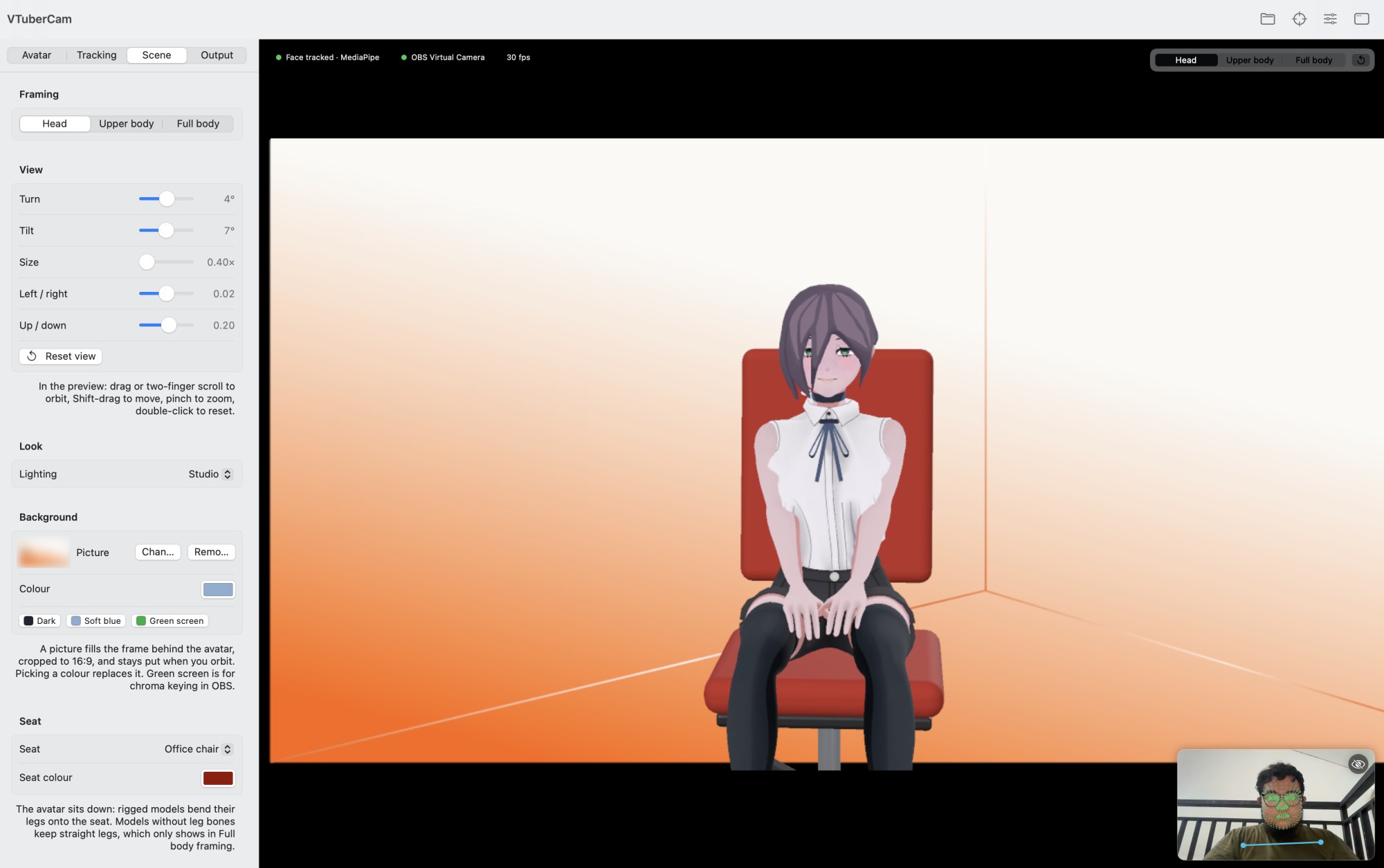
You point it at a webcam and load a .usdz model. The avatar follows your head, face, arms and fingers, sits on an office chair or couch in front of a background of your choice, and appears in your meeting app as a camera.
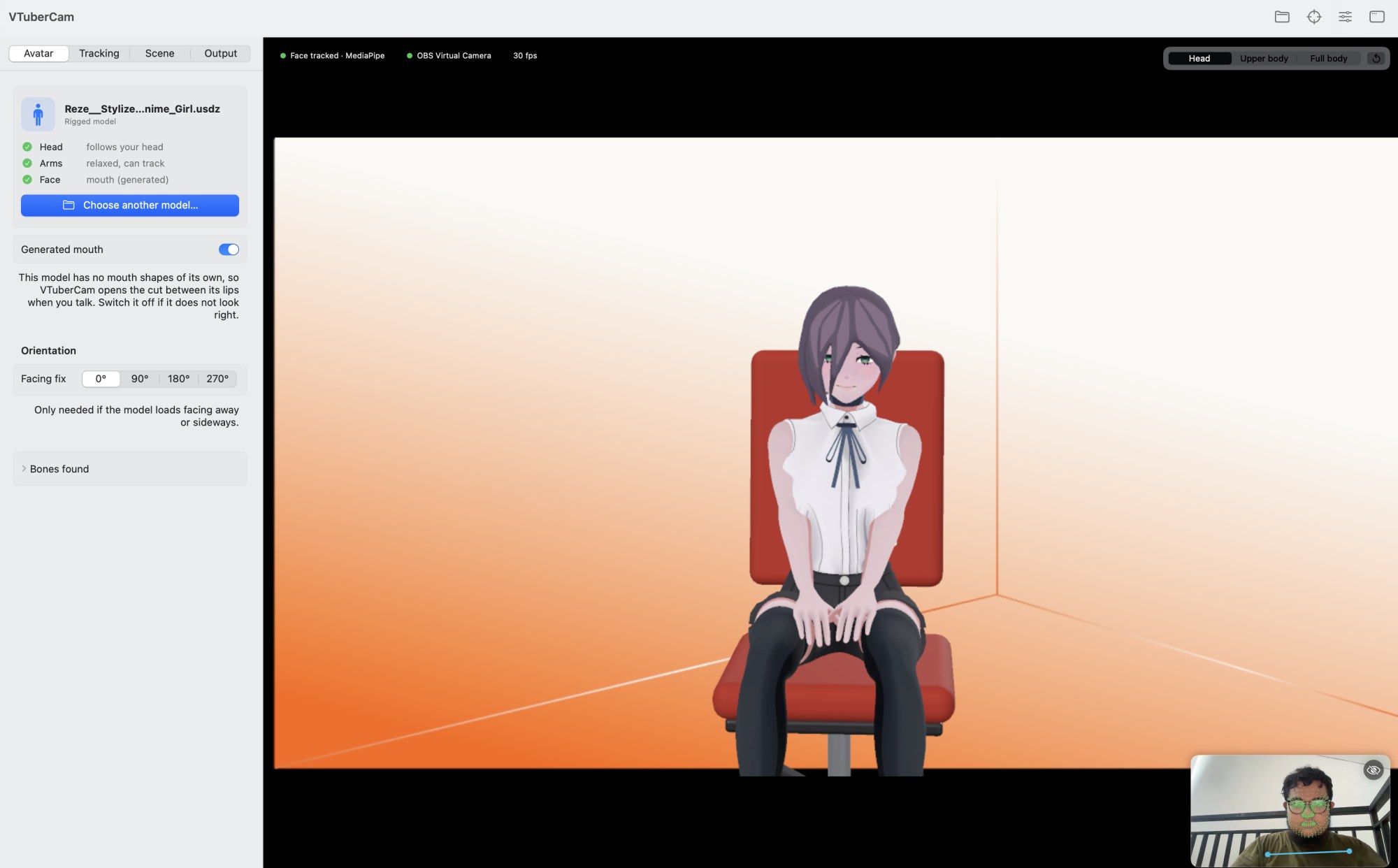
The inset in the bottom corner is the camera feed with the tracked landmarks overlaid, which makes tracking problems easy to see.
Architecture
The app is native Swift. SceneKit with Metal renders the avatar offscreen at 1280x720, 30 fps, with 2x supersampling. Tracking is delegated to Google MediaPipe, which runs as a local helper process.
Getting more detail out of the same camera
The first design question was where to spend pixels. A 1080p frame holds a face that may only be a few hundred pixels wide, and landmark models work on a fixed-size input, so downscaling the whole frame throws away exactly the detail the model needs.
The fix is two stages:
- Apple Vision finds the face at any size. It is built in and cheap.
- Only a full-resolution crop around the face is sent to MediaPipe Face Landmarker, which sees far more detail than it would from the whole frame.
That crop goes over a pipe to a Python helper. The protocol is deliberately small: a 32-byte binary header (magic, width, height, timestamp, the crop rectangle as normalised floats), followed by raw RGBA pixels. The helper answers with one JSON object per line holding the face transform, the 52 blendshape scores, the 478 landmarks, and optional pose and hand data. Keeping it as a plain stdin/stdout stream means the helper can be tested on a single image from the command line without the app.
On an M4 this takes about 5 to 11 ms per frame, which leaves comfortable headroom inside a 33 ms frame budget. If MediaPipe is not installed, the app falls back to Apple's Vision framework, at the cost of accuracy on large head turns, because yaw and pitch then come from 2D landmarks.
Making hands believable
Heads are the easy part, because MediaPipe returns a 3D face transform. Arms and hands are harder because the camera only sees a 2D picture of them.
The approach is to reduce the problem to something solvable:
- Place the hand relative to the face. A visible hand is positioned relative to the face, with depth estimated from the hand's apparent size.
- Reach it with two-bone IK. The avatar's shoulder, elbow and wrist form a two-bone chain, so given a target for the wrist the elbow position falls out of the geometry. This is why a blown kiss really reaches the avatar's mouth.
- Drive every finger from MediaPipe Hands' 21 joints per hand.
- Fall back when hands are out of view. MediaPipe Pose and Apple Vision cover the arms when the hands leave the frame, and an arm that is out of view rests its hand on the lap.
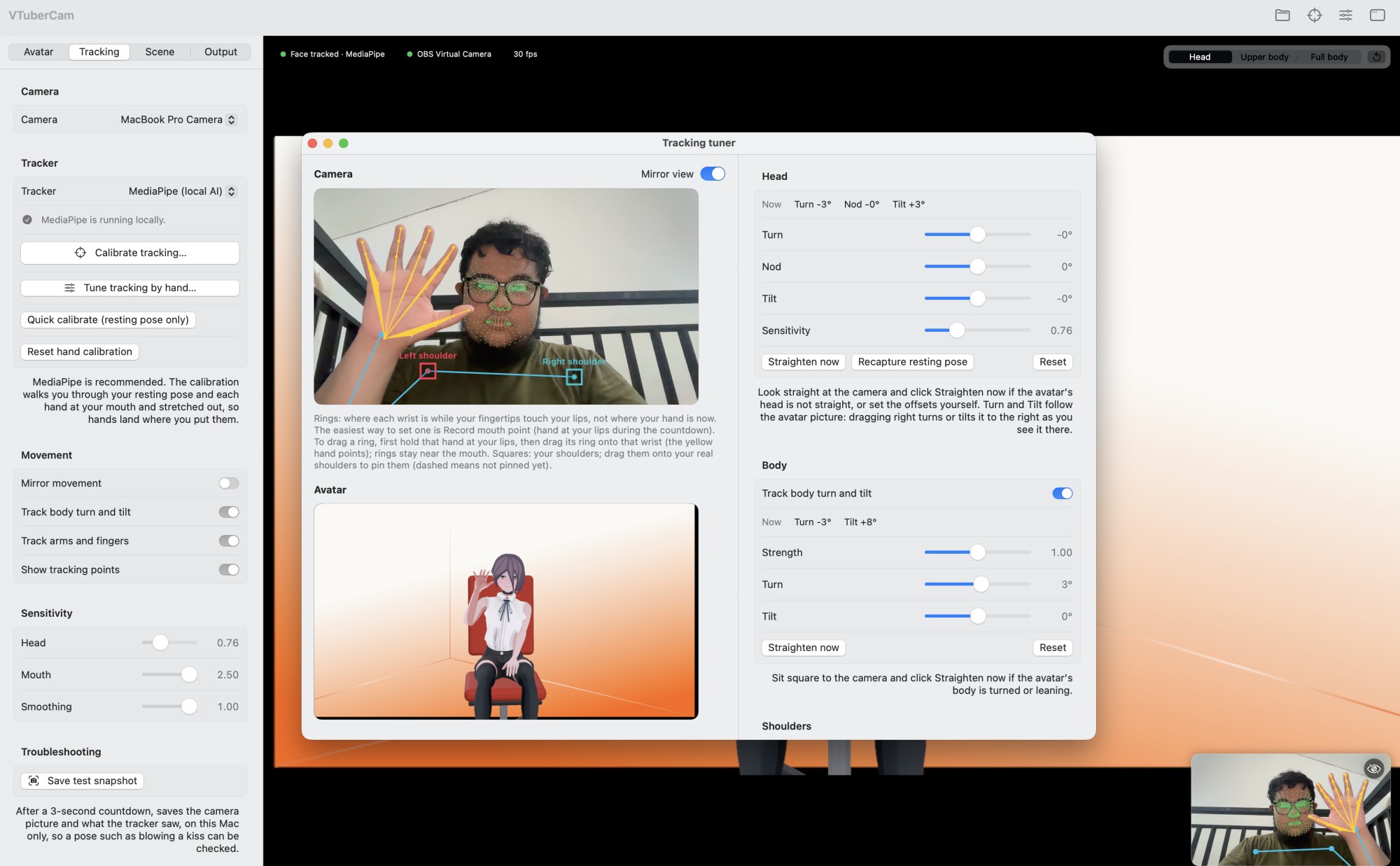
Real tracking data is noisy, so a lot of the code is defensive. A hand the tracker reports twice counts once, so raising one hand does not raise both arms. Arm joints that fall outside the picture are ignored. A single hand keeps its own side while it reaches across the face. Finger joints only bend in their curl direction, so jitter cannot kink a finger sideways.
Smoothing without lag
Raw landmarks jitter, but heavy smoothing makes the avatar feel laggy. The solver uses a One Euro filter on each tracked channel. It lowers the cutoff when the signal is slow, which removes jitter at rest, and raises it with speed, which keeps fast movement responsive. The user-facing "Smoothing" slider maps onto the filter's cutoff, and channels marked as fast keep a higher cutoff floor so quick movements stay responsive.
Calibration and the tracking tuner
People differ in arm length and in where their hand sits when it touches their mouth, and an avatar's proportions differ again. A guided five-step calibration records a resting pose, each hand at the mouth, and each arm stretched out, so hands map onto the avatar's own mouth and reach.
For fine adjustment there is a separate tracking tuner window, with the live camera and the avatar side by side. Draggable rings and squares let you place the expected wrist positions and shoulders directly on the camera image, and every change applies immediately and is saved.
Working with models it has never seen
The part that took the most care is accepting arbitrary rigged models. Avatars come from Mixamo, VRM, Unreal, Rigify and others, and downloads from Sketchfab often rename bones to anonymous names such as n1, n2.
The solution has layers:
- Match known bone names from the common rig standards.
- Infer from the skeleton's shape when names are missing. For example, the chest is the bone with one chain going up (neck and head) and two other chains reaching out to the arms, and the hips are where the legs meet the spine's chain.
- Infer from the mesh for size, upright orientation and facing, measured from the posed mesh. Parts that float away from the body, as some converted files leave hats or bows metres to the side, are hidden.
- Rotate bones in the avatar's own frame instead of per rig, so one solver drives every skeleton.
Faces get similar treatment. Blinks, mouth and gaze work through ARKit-style or VRM blend shapes if the model has them, through face bones found from where they sit, or through a jaw bone for the mouth only. For models with no mouth shapes whose lips are a cut in the face mesh, the app finds that cut and builds its own mouth-open blend shape from it.
Getting frames into a meeting
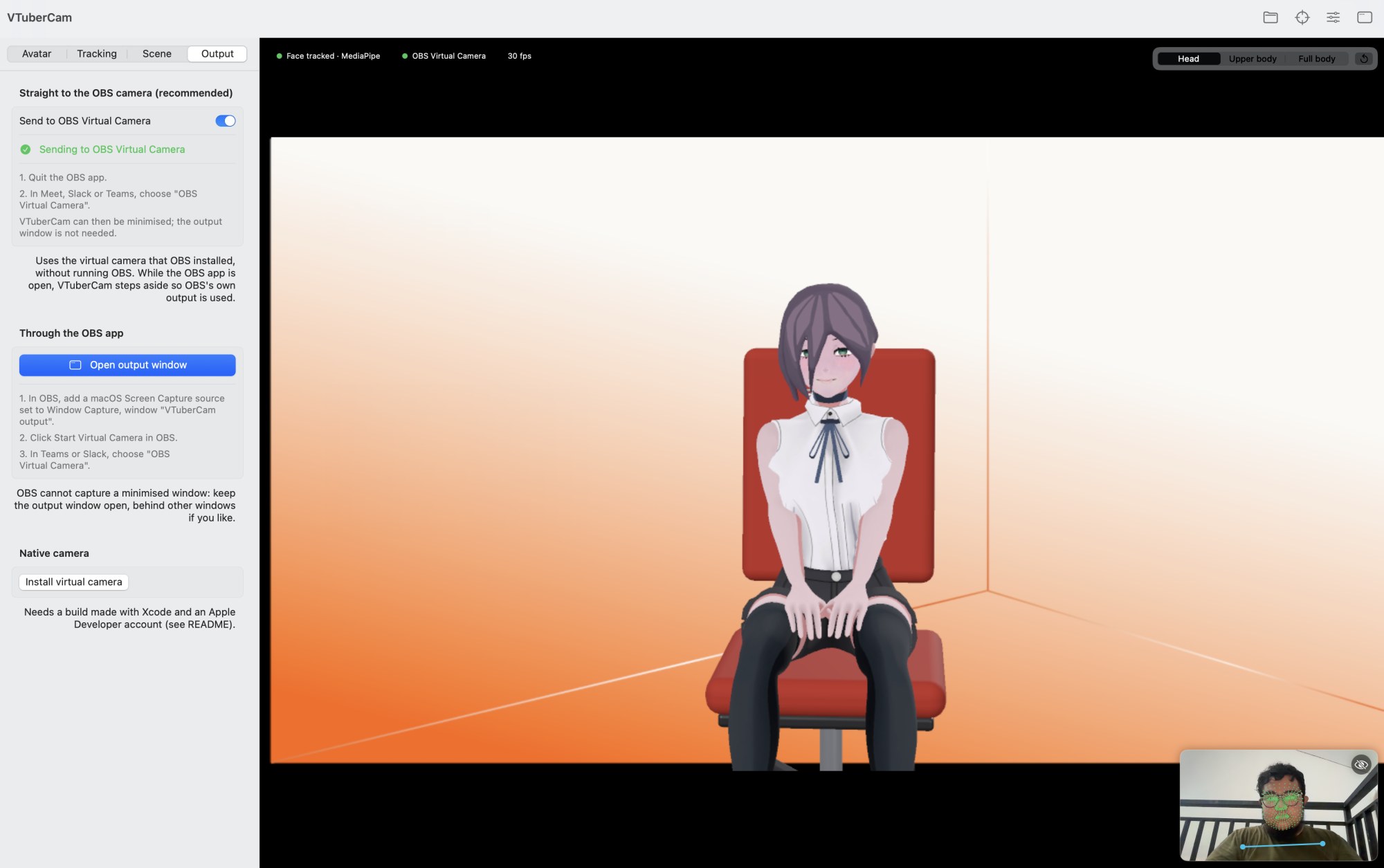
There are three ways out, in order of effort:
- OBS Virtual Camera, directly. VTuberCam feeds the virtual camera that OBS installs, so neither the OBS app nor the output window needs to be open. This is the recommended path.
- Through the OBS app. A window-capture source in OBS picks up VTuberCam's output window.
- A native camera. A Core Media I/O camera extension publishes a camera named "VTuberCam". macOS only loads it when it is properly signed, which needs Xcode and an Apple Developer Program membership.
I will be straightforward about the third: it compiles, but I have not run it end to end, because that Mac has no Xcode or signing certificate. The OBS path is what actually works today.
Scene controls
Framing (head, upper body or full body), orbit and zoom like a 3D viewer, lighting, a picture or green-screen background, and a seat the avatar sits on. Rigged models bend their legs onto the seat, which is found by leg bone names or, failing that, from the skeleton's shape.
Testing without a camera
Since tracking depends on a live person, debugging would be painful without offline tools. The app ships command-line diagnostics: one that lists a model's meshes and bones and which bones were matched, one that renders a single posed frame to a PNG and prints the frame time, and one that runs the MediaPipe helper on a still image and prints head angles and the strongest expressions. A snapshot button saves the camera picture and what the tracker saw, so a tricky pose can be reproduced later.
Limits
- With the Apple Vision fallback, head yaw and pitch are less accurate on large turns, and arm tracking is 2D only.
- Expressions beyond mouth and blinks need a model with ARKit-named blend shapes.
- Models with no skeleton get a "virtual neck": everything above the measured neck line moves with the head, but arms and face cannot move.
- Arms and fingers need to be inside the camera picture.
- The native camera path is untested end to end.
Takeaways
- Spend pixels where the model needs them. Sending MediaPipe a full-resolution crop gives it far more detail than a downscaled whole frame.
- A small, text-friendly protocol between processes made the Python helper easy to test and replace.
- Reduce hard 3D problems to solvable geometry. Face-relative placement plus two-bone IK gets believable arms from a 2D camera.
- Most of the work is defensive. Real tracking and real models are messy, and handling duplicate hands, off-screen joints and anonymous bones is what makes it usable.
The source repository is not public yet. A project summary is on the VTuberCam project page.